Introduction
Oracle Integration Cloud VPN is a critical setup used in enterprise integrations where secure communication between on-premise systems and Oracle Cloud is required. In real-world Oracle projects, especially in banking, healthcare, and manufacturing domains, exposing internal APIs publicly is not acceptable due to strict security policies. This is where VPN connectivity in Oracle Integration Cloud (OIC Gen 3) becomes essential.
From an implementation standpoint, VPN ensures that your integrations run over a private, encrypted network instead of the public internet. This significantly improves security, compliance, and performance.
In this blog, we will walk through the complete practical implementation of Oracle Integration Cloud VPN, including architecture, setup steps, troubleshooting, and real project scenarios.
What is Oracle Integration Cloud VPN?
Oracle Integration Cloud VPN is a secure IPSec-based connection between your on-premise network (or another cloud) and Oracle Cloud Infrastructure (OCI), where OIC Gen 3 is hosted.
Instead of exposing your internal systems through public endpoints, VPN creates a private tunnel allowing OIC integrations to communicate securely with:
-
On-premise ERP systems (SAP, legacy apps)
-
Internal databases
-
Middleware like WebLogic or custom APIs
-
Private REST/SOAP services
Key Concept
-
Uses IPSec tunnels
-
Configured via OCI Networking
-
Works with Dynamic Routing Gateway (DRG) and Customer Premises Equipment (CPE)
Real-World Integration Use Cases
Use Case 1 – SAP On-Premise Integration
A manufacturing company runs SAP ECC on-premise. They need to:
-
Send purchase orders from Oracle ERP Cloud
-
Receive invoice updates back into Fusion
Since SAP APIs are internal, VPN is used to securely connect OIC to SAP.
Use Case 2 – Banking System Integration
A financial institution integrates:
-
Oracle Fusion Financials
-
Core Banking System (on-premise)
Due to compliance requirements (RBI, PCI DSS), APIs cannot be exposed publicly. VPN ensures encrypted communication.
Use Case 3 – HR System Data Migration
An organization migrates employee data from a legacy HR system:
-
Legacy DB → OIC → Fusion HCM (via HDL)
VPN allows OIC to access the internal database securely.
Architecture / Technical Flow
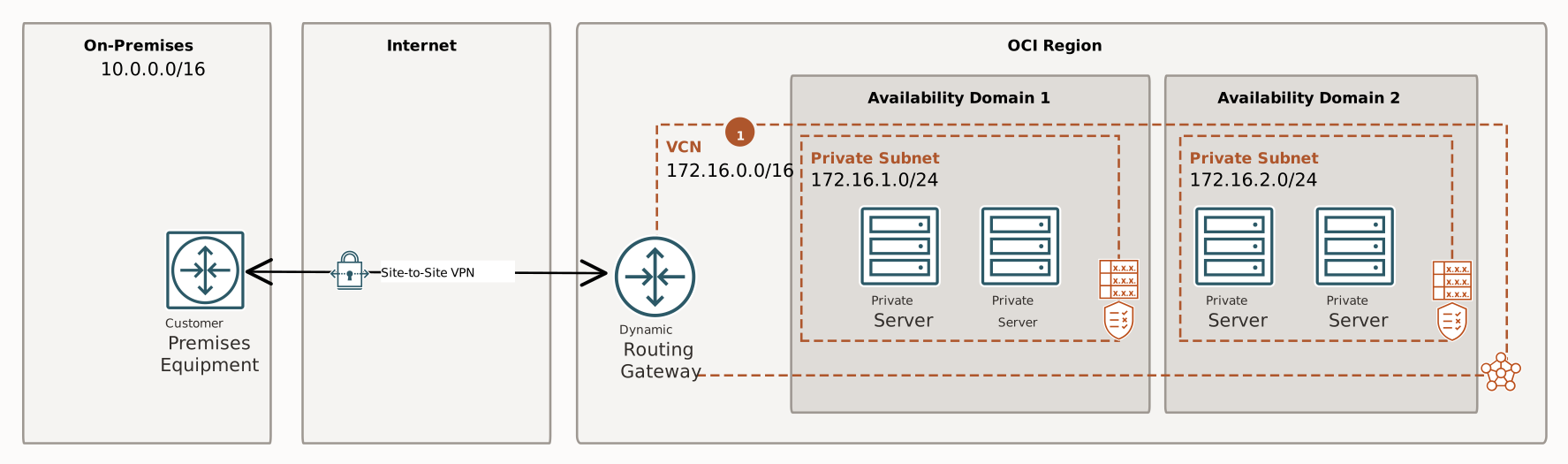
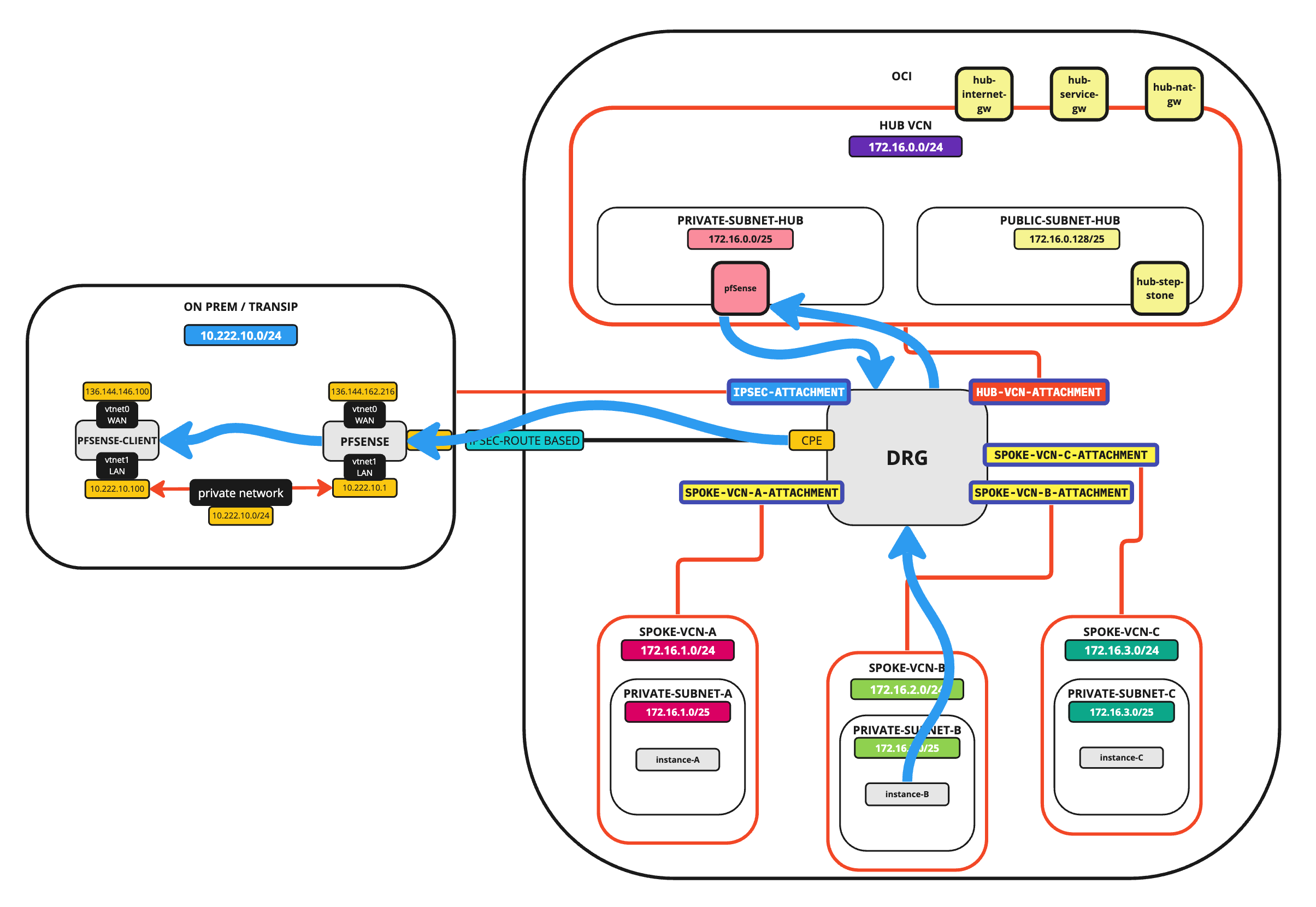
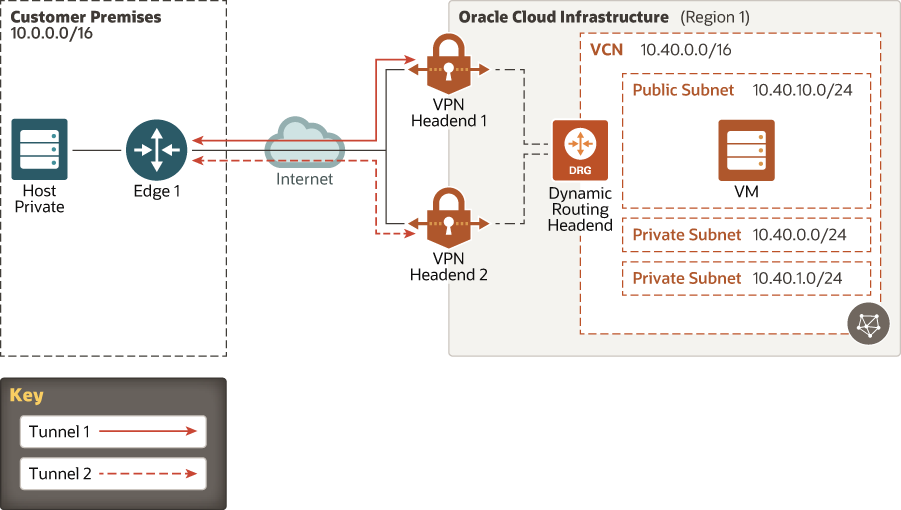
How It Works
-
Customer Premises Equipment (CPE)
Your on-premise firewall/router (e.g., Cisco, Fortinet) -
IPSec Tunnel Encrypted tunnel over internet
-
Dynamic Routing Gateway (DRG) OCI component that routes traffic
-
VCN (Virtual Cloud Network) OIC Gen 3 runs inside OCI VCN
-
Private Endpoint Access OIC connects to internal systems via private IP
Prerequisites
Before setting up Oracle Integration Cloud VPN, ensure:
Infrastructure Requirements
-
OCI account with networking permissions
-
OIC Gen 3 instance deployed
-
VCN already created
Network Details Required
-
On-premise public IP
-
Internal subnet details
-
Routing rules
-
Firewall access rules
Security Requirements
-
IPSec parameters (IKE version, encryption)
-
Shared secret key
Step-by-Step Build Process
Step 1 – Create Customer Premises Equipment (CPE)
Navigation: OCI Console → Networking → Customer Premises Equipment
Configuration:
-
Name:
CPE_OIC_OnPrem -
IP Address: On-prem firewall public IP
👉 This represents your on-premise network device.
Step 2 – Create Dynamic Routing Gateway (DRG)
Navigation: OCI → Networking → Dynamic Routing Gateway
Steps:
-
Create DRG
-
Attach DRG to your VCN
👉 DRG acts as a bridge between OCI and your on-premise network.
Step 3 – Create IPSec Connection
Navigation: OCI → Networking → Site-to-Site VPN
Configuration:
-
Select CPE
-
Select DRG
-
Choose routing type (Static or BGP)
Important Fields:
| Field | Value |
|---|---|
| Tunnel Type | IPSec |
| Routing | Static/BGP |
| Shared Secret | Custom key |
| Encryption | AES256 |
👉 OCI automatically generates tunnel endpoints.
Step 4 – Configure On-Premise Firewall
Configure your firewall (Cisco/Fortinet/etc.):
-
Add tunnel configuration
-
Use OCI-provided parameters:
-
Public IPs
-
Pre-shared key
-
Encryption algorithms
-
👉 This is usually handled by network/security teams.
Step 5 – Update Route Tables
Navigation: OCI → VCN → Route Tables
Add route rule:
-
Destination: On-prem subnet (e.g., 192.168.1.0/24)
-
Target: DRG
👉 This ensures traffic is routed through VPN.
Step 6 – Configure Security Lists
Allow traffic between:
-
OIC subnet
-
On-premise subnet
Example:
-
Source: 192.168.1.0/24
-
Protocol: TCP
-
Port: 80 / 443
Step 7 – Configure OIC Connectivity
Inside OIC Gen 3:
-
Use REST Adapter / SOAP Adapter
-
Endpoint URL should be private IP or internal hostname
Example:
👉 No public exposure required.
Testing the VPN Setup
Step 1 – Verify Tunnel Status
OCI Console → VPN → Check:
-
Tunnel Status: UP
Step 2 – Ping Test
From a compute instance inside VCN:
Step 3 – Integration Test
Create a simple OIC integration:
-
Trigger: REST
-
Invoke: On-prem API
Sample Payload
Expected Result
-
Successful response from on-prem system
-
No timeout errors
Validation Checklist
-
VPN tunnel is active
-
Routes are configured correctly
-
Firewall ports are open
-
DNS resolution works (if hostname used)
Common Errors and Troubleshooting
Issue 1 – Tunnel Down
Cause:
-
Incorrect shared key
-
Firewall misconfiguration
Solution:
-
Recheck IPSec parameters
Issue 2 – Connection Timeout
Cause:
-
Missing route table entry
-
Firewall blocking traffic
Issue 3 – DNS Not Resolving
Solution:
-
Use private IP instead of hostname
-
Configure DNS resolver
Issue 4 – Intermittent Connectivity
Cause:
-
Single tunnel dependency
Solution:
-
Use redundant tunnels (high availability)
Best Practices
1. Use High Availability VPN
Always configure:
-
Dual tunnels
-
Redundant DRG paths
2. Prefer Private Endpoints in OIC Gen 3
Avoid public endpoints wherever possible.
3. Monitor VPN Health
Use OCI Monitoring:
-
Tunnel status alerts
-
Latency metrics
4. Secure Firewall Rules
-
Restrict only required ports
-
Avoid open access
5. Use Naming Standards
Example:
-
VPN_OIC_PROD -
DRG_FINANCE -
CPE_HR_SYSTEM
6. Document Network Architecture
Always maintain:
-
IP mappings
-
Routing tables
-
Firewall rules
Real Consultant Tip
In one of our implementations, the integration was failing intermittently. The issue was not OIC—it was:
-
Firewall session timeout set to 60 seconds
We increased it to 300 seconds, and the issue was resolved.
👉 Lesson: Always involve network teams early.
Summary
Oracle Integration Cloud VPN is a critical component for secure enterprise integrations. It enables:
-
Private communication between OIC and on-prem systems
-
Compliance with security standards
-
Reliable and scalable connectivity
From a consultant perspective, success depends on:
-
Proper network planning
-
Correct routing and firewall setup
-
Thorough testing
If implemented correctly, VPN becomes a stable backbone for all hybrid integrations.
Frequently Asked Questions (FAQs)
1. Can OIC work without VPN?
Yes, but only if APIs are exposed publicly. VPN is required for private, secure integrations.
2. What is the difference between VPN and FastConnect?
-
VPN: Uses internet (encrypted)
-
FastConnect: Dedicated private connection (higher performance)
3. How many tunnels are required?
Minimum:
-
2 tunnels (for redundancy)
Additional Reference
For official Oracle documentation, refer to:
https://docs.oracle.com/en/cloud/saas/index.html