Introduction
VBCS Oracle Integration Cloud is one of the most powerful combinations in modern Oracle Fusion implementations. In real-world projects, we rarely build standalone integrations or standalone UI applications — instead, we combine Oracle Visual Builder Cloud Service (VBCS) with Oracle Integration Cloud (OIC Gen 3) to deliver complete business solutions.
As a consultant, you will often face scenarios where business users need a custom UI (not available in Fusion) and backend integrations with multiple systems. This is where VBCS + OIC becomes critical.
In this article, we will go deep into how VBCS works with Oracle Integration Cloud, covering architecture, real-time use cases, step-by-step implementation, and practical tips from real projects.
What is VBCS Oracle Integration Cloud?
VBCS Oracle Integration Cloud refers to the integration pattern where:
-
VBCS (UI Layer) → Builds web/mobile applications
-
OIC Gen 3 (Integration Layer) → Handles integrations, APIs, transformations
-
Fusion/3rd Party Systems (Backend Layer) → Source/target systems
Simple Understanding
| Component | Role |
|---|---|
| VBCS | Frontend UI for users |
| OIC | Business logic + integration orchestration |
| Fusion Apps / External Systems | Data providers |
👉 In simple terms:
VBCS calls OIC APIs → OIC processes → returns response → VBCS displays data
Real-World Integration Use Cases
1. Employee Onboarding Portal
-
VBCS: Custom onboarding UI
-
OIC: Integrates with Fusion HCM, creates worker
-
External: Background verification system
👉 Example: A company does not want HR users to directly access Fusion. Instead, they use a VBCS portal where managers submit onboarding requests.
2. Supplier Registration System
-
VBCS: Vendor self-service portal
-
OIC: Creates supplier in Fusion Procurement
-
External: Tax validation API
👉 Real scenario: Suppliers fill data in VBCS → OIC validates → creates supplier → sends confirmation.
3. Expense Approval Dashboard
-
VBCS: Manager dashboard
-
OIC: Fetches expense reports from Fusion
-
Additional: Sends approval/rejection back
👉 Key benefit: Improves user experience compared to standard Fusion screens.
Architecture / Technical Flow
VBCS + OIC Integration Flow

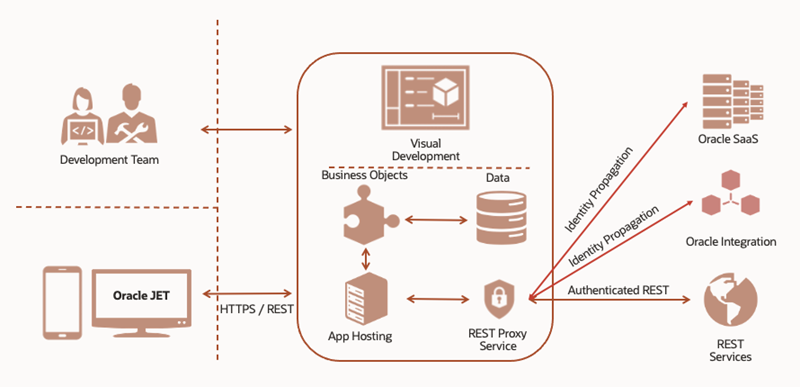

Flow Explanation
-
User interacts with VBCS UI
-
VBCS calls OIC REST endpoint
-
OIC processes:
-
Transformation
-
Routing
-
Calls Fusion APIs / External APIs
-
-
OIC sends response back
-
VBCS displays data
👉 Important:
Always keep business logic in OIC, not in VBCS.
Prerequisites
Before implementing VBCS Oracle Integration Cloud:
Required Access
-
VBCS instance
-
OIC Gen 3 instance
-
Fusion Cloud access (HCM/ERP/SCM)
-
API credentials
Technical Knowledge
-
REST APIs
-
JSON payloads
-
OAuth / Basic Auth
-
Oracle Fusion SOAP/REST APIs
Step-by-Step Build Process
Let’s build a real-world scenario: Employee Creation using VBCS + OIC
Step 1 – Create Integration in OIC
Navigate to:
OIC Console → Integrations → Create
Create REST Integration
-
Style: REST
-
Pattern: App Driven Orchestration
Configure Trigger
-
Resource URI:
/createEmployee -
Method: POST
Sample Request Payload
Step 2 – Map to Fusion HCM API
-
Use REST Adapter
-
Call Worker API
Example Endpoint:
Mapping
| Input Field | Fusion Field |
|---|---|
| firstName | FirstName |
| lastName | LastName |
| WorkEmail |
Step 3 – Activate Integration
-
Validate integration
-
Click Activate
👉 Tip: Always test via Postman before connecting to VBCS.
Step 4 – Create VBCS Application
Navigate to:
VBCS → Create Application → Web App
Step 5 – Create Service Connection
-
Go to Services → Add Service Connection
-
Type: REST
Configure:
-
Endpoint URL: OIC REST endpoint
-
Security: OAuth / Basic
Step 6 – Create UI Page
Add form fields:
-
First Name
-
Last Name
-
Email
Add Submit Button
Step 7 – Bind Action to OIC API
-
On button click → Call REST Service
-
Pass input fields as payload
Example:
Step 8 – Display Response
-
Show success message
-
Display employee ID returned from OIC
Testing the Technical Component
Test Scenario
Input:
-
First Name: Ravi
-
Last Name: Kumar
-
Email: ravi@test.com
Expected Flow
-
VBCS sends request to OIC
-
OIC creates worker in Fusion
-
Response returns success
Validation Checks
-
Employee created in Fusion
-
Email correctly mapped
-
No errors in OIC tracking
Common Errors and Troubleshooting
1. Authentication Errors
Issue: 401 Unauthorized
Fix:
-
Check OAuth token
-
Validate credentials
2. CORS Issues
Issue: VBCS cannot call OIC
Fix:
-
Enable CORS in OIC
-
Use proper headers
3. Payload Mapping Errors
Issue: Invalid data format
Fix:
-
Validate JSON structure
-
Use correct Fusion API schema
4. Timeout Issues
Issue: Integration taking too long
Fix:
-
Optimize OIC logic
-
Avoid heavy transformations in VBCS
Best Practices
1. Keep Business Logic in OIC
Never implement logic in VBCS JavaScript.
2. Use Named Credentials
Avoid hardcoding URLs and credentials.
3. Implement Error Handling in OIC
-
Use Fault Handlers
-
Return meaningful messages
4. Use Pagination for Large Data
Avoid loading large datasets directly in VBCS.
5. Secure APIs
-
Use OAuth 2.0
-
Avoid exposing endpoints publicly
6. Version Your Integrations
Example:
-
/v1/createEmployee -
/v2/createEmployee
Real Consultant Tips (From Projects)
-
Always build OIC first, then connect VBCS
-
Use Postman extensively before UI integration
-
Keep response payload clean (remove unnecessary fields)
-
Use reusable integrations in OIC
-
Design UI with minimal API calls
Frequently Asked Questions (FAQs)
1. Can VBCS directly call Fusion APIs without OIC?
Yes, but not recommended.
👉 Best practice is to use OIC as middleware for:
-
Security
-
Transformation
-
Reusability
2. Which authentication is best for VBCS to OIC?
-
OAuth 2.0 (recommended)
-
Basic Auth (only for testing)
3. Is VBCS mandatory for Oracle Cloud projects?
No. But it is highly useful when:
-
Custom UI is required
-
Mobile apps are needed
-
Fusion UI is not sufficient
Summary
VBCS Oracle Integration Cloud is a powerful combination that enables organizations to build modern, scalable, and user-friendly applications on top of Oracle Fusion.
From a consultant’s perspective:
-
VBCS handles UI
-
OIC handles integration and logic
-
Fusion acts as backend system
This separation ensures:
-
Clean architecture
-
Scalability
-
Maintainability
In almost every real-world Oracle implementation today, this pattern is becoming standard.
For deeper technical details and official guidance, refer Oracle documentation:
https://docs.oracle.com/en/cloud/saas/index.html