Introduction
In Oracle Integration Cloud Message Pack, one of the most critical considerations for enterprise integrations is handling large payloads efficiently and reliably. As organizations scale their integrations using Oracle Integration Cloud, message size limitations and performance constraints become real challenges.
In real-world implementations, I’ve seen integrations fail not because of logic issues, but due to improper message handling strategies—especially when dealing with bulk data, attachments, or high-volume transactions. This is where the concept of Message Pack in Oracle Integration Cloud becomes essential.
This article explains the concept in a practical, consultant-style manner with real use cases, configuration insights, and troubleshooting guidance aligned with OIC Gen 3 (latest architecture).
What is Oracle Integration Cloud Message Pack?
Oracle Integration Cloud Message Pack refers to the mechanism of handling, segmenting, and processing large payload messages within OIC integrations. Instead of sending or processing one large message, data is broken into smaller manageable chunks (packs) and processed sequentially or in parallel.
Why Message Pack Matters
In OIC Gen 3:
- Message size limits still apply (especially for synchronous flows)
- Large payloads can cause:
- Timeouts
- Memory issues
- Failed integrations
- Message packing ensures:
- Better performance
- Scalability
- Fault tolerance
Simple Concept
Instead of sending:
You send:
This approach improves both reliability and performance.
Real-World Integration Use Cases
1. Bulk Employee Data Integration (HCM)
Scenario:
- Extract 50,000 employee records from Oracle Fusion HCM
- Send to a third-party payroll system
Problem:
- Payload too large → Integration failure
Solution:
- Split into message packs of 1000 records
- Process asynchronously
2. Invoice Data Transfer (ERP)
Scenario:
- Send bulk invoices from Oracle Fusion ERP to external tax system
Challenge:
- Large XML payload causes timeout
Solution:
- Use message pack strategy with staged file processing
3. File Upload to Object Storage
Scenario:
- Upload large files via Oracle Cloud Infrastructure Object Storage
Approach:
- Break file into chunks
- Upload in parts
- Reassemble at destination
Architecture / Technical Flow
Message Pack Processing Flow in OIC Gen 3
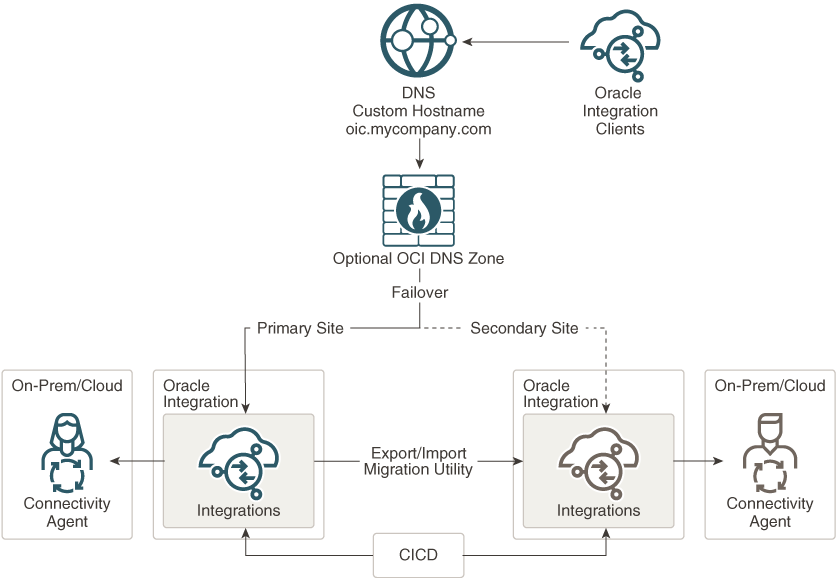
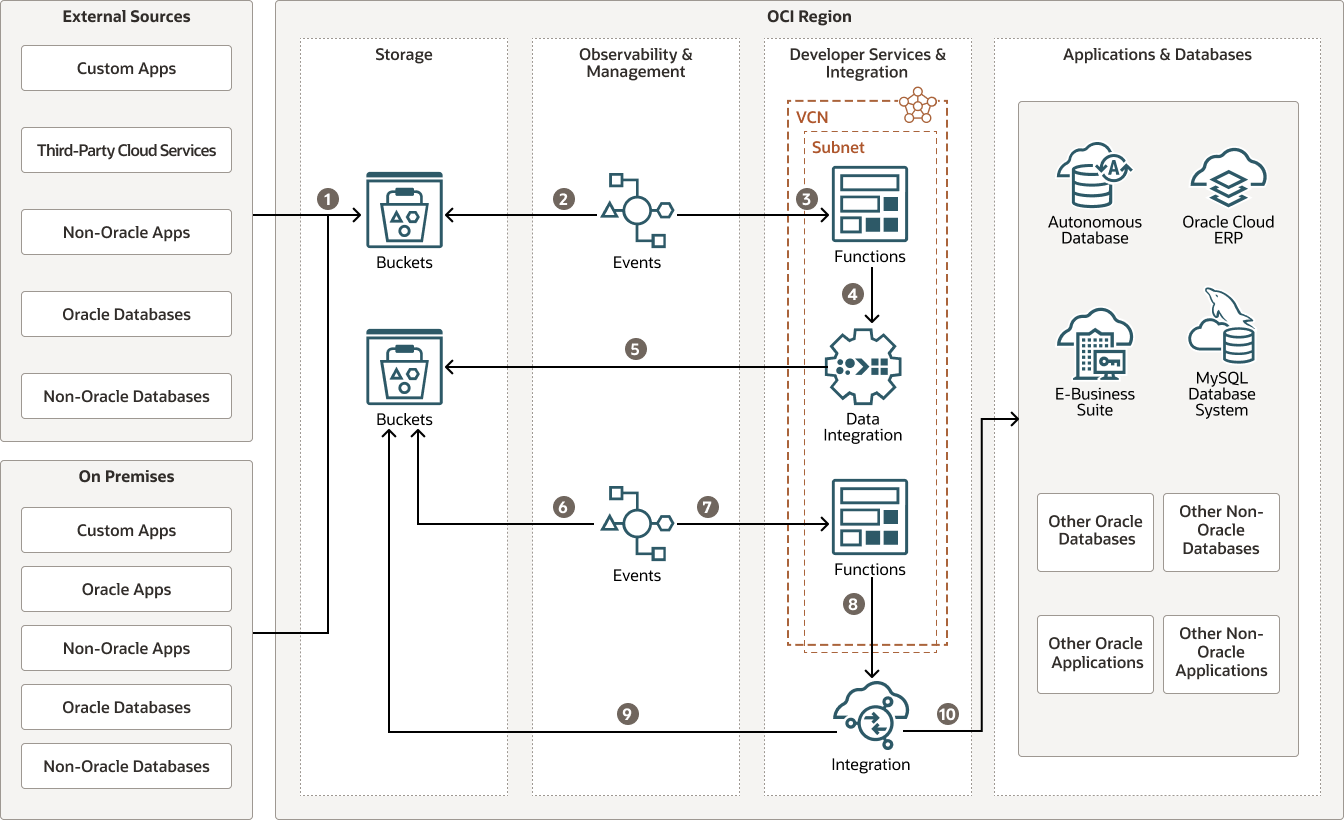
Flow Explanation
- Source system sends large dataset
- OIC receives payload
- Data is split into chunks (message packs)
- Each pack is processed individually
- Results are aggregated (if required)
Key Components
| Component | Role |
|---|---|
| Stage File Action | Used for chunking large files |
| For-Each Loop | Iterates through message packs |
| Scope | Handles batch-level errors |
| Async Integration | Handles long-running processing |
Prerequisites
Before implementing Message Pack strategy:
- OIC Gen 3 instance configured
- Required connections created:
- REST Adapter
- FTP Adapter (optional)
- File Server / Stage File access
- Understanding of:
- XML/JSON structures
- For-Each loops
- Fault handling
Step-by-Step Build Process
Let’s walk through a practical implementation scenario.
Use Case:
Process large employee data file in chunks.
Step 1 – Create Integration
Navigate to:
Home → Integrations → Create
- Type: App Driven Orchestration (Async)
Step 2 – Configure Trigger
- Use REST Adapter
- Accept payload (JSON/XML)
Example:
Step 3 – Stage File Action (Chunking)
Add Stage File → Read File in Segments
Key configurations:
- File Format: Delimited / XML / JSON
- Segment Size: 500–1000 records
💡 Consultant Tip:
- Always test with different chunk sizes (500, 1000, 2000) to find optimal performance.
Step 4 – Add For-Each Loop
- Loop through each segment
Configuration:
- Input: Segmented records
- Batch processing logic inside loop
Step 5 – Process Each Message Pack
Inside For-Each:
- Call external API
- Transform data
- Insert into target system
Example:
- Call Payroll API for each batch
Step 6 – Error Handling (Scope)
Add Scope inside loop:
- Catch faults
- Log failed batches
- Continue processing
Step 7 – Response Handling
- Aggregate results (optional)
- Send final response
Testing the Technical Component
Test Scenario
Upload file with:
- 5000 employee records
Expected Behavior
- File split into 5 chunks
- Each chunk processed independently
Validation Checks
- Check instance tracking
- Verify:
- Number of processed batches
- Success/failure logs
- Target system records
Common Errors and Troubleshooting
1. Payload Too Large Error
Cause:
- Message exceeds OIC limit
Solution:
- Reduce chunk size
- Use Stage File
2. Timeout Issues
Cause:
- Synchronous integration
Solution:
- Switch to async pattern
3. Partial Processing Failure
Cause:
- One chunk fails
Solution:
- Implement retry logic
- Log failed batches separately
4. Memory Consumption Issues
Cause:
- Large in-memory processing
Solution:
- Use streaming approach (Stage File)
Best Practices
1. Always Use Async Integrations
For large payloads:
- Avoid synchronous APIs
2. Optimize Chunk Size
- Too small → overhead
- Too large → failures
Recommended:
- 500–1000 records
3. Use Stage File for Large Data
- Avoid in-memory processing
4. Implement Fault Isolation
- Process batches independently
- Avoid full integration failure
5. Enable Tracking
- Track batch IDs
- Maintain audit logs
6. Design for Scalability
- Parallel processing (if possible)
- Stateless integrations
Real Consultant Insight
In one of my projects:
- Client tried sending 100K records in one API call
- Integration failed intermittently
We redesigned using:
- Message Pack approach
- Chunk size: 1000
- Async processing
Result:
- 70% performance improvement
- Zero failures in production
FAQs
1. What is the ideal message pack size in OIC?
Typically:
- 500–1000 records per chunk
However:
- Depends on payload complexity and API limits
2. Can we process message packs in parallel?
Yes, using:
- Parallel For-Each (controlled carefully)
- Multiple integrations
But ensure:
- No data dependency issues
3. Is Message Pack required for all integrations?
No.
Use it when:
- Large payloads
- Bulk data processing
- Performance optimization required
Summary
Oracle Integration Cloud Message Pack is a critical design pattern for handling large data efficiently in enterprise integrations. Instead of processing massive payloads in a single transaction, breaking them into manageable chunks ensures:
- Better performance
- Improved reliability
- Fault tolerance
- Scalability
In OIC Gen 3 implementations, this approach is not optional—it is a best practice for any serious integration project.
If you are designing integrations involving bulk data, always think in terms of message packs rather than single payload processing.
For deeper technical understanding, refer to official Oracle documentation:
https://docs.oracle.com/en/cloud/saas/index.html