Introduction
In modern hybrid integration architectures, securely connecting cloud applications with on-premises systems is one of the biggest challenges. The Connectivity Agent in Oracle Integration Cloud plays a critical role in solving this problem by enabling secure communication without exposing internal systems to the internet.
In real-world Oracle implementations, especially in Fusion ERP, HCM, and SCM integrations, customers often need to connect with legacy systems, databases, or internal applications. This is where the Connectivity Agent becomes essential.
This article provides a deep, practical understanding of the Connectivity Agent, including architecture, setup, real use cases, and troubleshooting based on actual project experience.
What is Connectivity Agent in Oracle Integration Cloud?
The Connectivity Agent is a lightweight Java-based component installed within the customer’s on-premises network. It establishes a secure, outbound-only connection to Oracle Integration Cloud, allowing OIC to access on-premises resources.
Key Characteristics:
- Runs inside customer firewall
- Uses outbound HTTPS communication only
- No inbound ports need to be opened
- Supports multiple adapters (DB, FTP, File Server, etc.)
- Works with OIC Gen 3 architecture
👉 In simple terms, it acts as a secure bridge between cloud and on-prem systems.
Key Features of Connectivity Agent
1. Secure Communication
- Uses TLS encryption
- No direct exposure of internal systems
- Ideal for compliance-heavy industries (Banking, Healthcare)
2. High Availability
- Supports multiple agent instances
- Load balancing between agents
- Failover capability
3. Adapter Support
Common adapters that use Connectivity Agent:
- Database Adapter
- FTP Adapter
- File Server Adapter
- On-prem SOAP/REST services
4. Easy Deployment
- Lightweight Java application
- Can be installed on Linux or Windows
- Minimal infrastructure requirement
Real-World Integration Use Cases
Use Case 1: Payroll Integration with On-Prem Database
A company uses Oracle Fusion HCM but maintains payroll data in an on-prem Oracle DB.
Solution:
- Connectivity Agent installed in data center
- OIC DB Adapter connects via agent
- Payroll data synced daily
Use Case 2: File-Based Integration with Legacy Systems
A manufacturing client generates flat files in an internal server.
Solution:
- File Server Adapter via Connectivity Agent
- OIC picks files and pushes to Fusion SCM
Use Case 3: Real-Time API Integration with Internal Application
A banking client exposes internal REST APIs.
Solution:
- Connectivity Agent enables secure REST calls
- No firewall exposure required
Architecture / Technical Flow
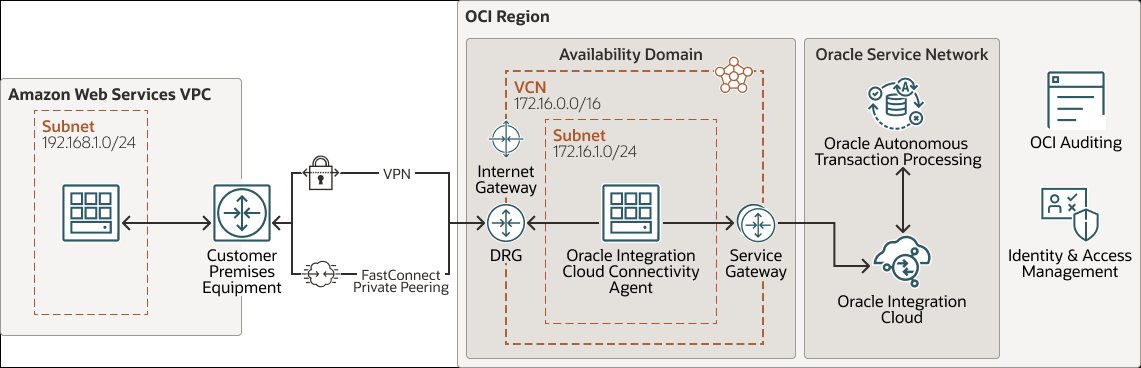

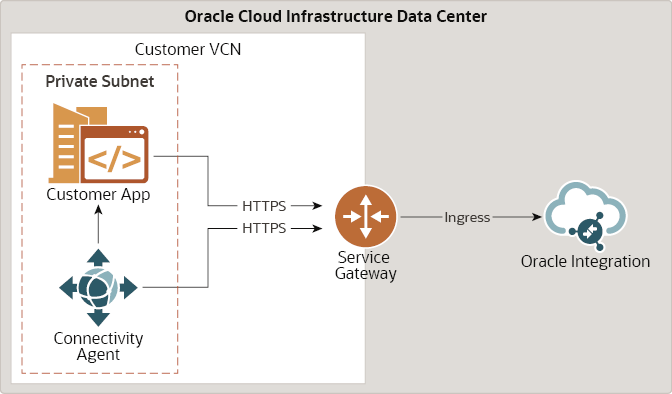
Flow Explanation:
- Connectivity Agent is installed on-prem
- Agent establishes outbound connection to OIC
- OIC sends requests through secure channel
- Agent forwards request to on-prem system
- Response flows back through same channel
👉 Important: Communication is always initiated by the agent, ensuring security.
Prerequisites
Before setting up Connectivity Agent, ensure the following:
1. OIC Instance
- Active Oracle Integration Cloud Gen 3 instance
2. Network Requirements
- Outbound HTTPS (port 443) enabled
- Access to Oracle cloud endpoints
3. Java Requirement
- JDK 8 or above installed
4. On-Prem System Access
- Database / FTP / APIs accessible from agent machine
5. User Permissions
- Access to OIC console
- Admin role for agent registration
Step-by-Step Connectivity Agent Setup
Step 1 – Download Connectivity Agent
Navigation:
OIC Console → Integrations → Connectivity Agents
- Click Download Agent Installer
- Choose OS (Linux/Windows)
Step 2 – Install Agent
Unzip the downloaded file:
Step 3 – Configure Agent
Edit configuration file:
Important parameters:
oic.url=https://your-instance.integration.ocp.oraclecloud.comagent.group.name=DEFAULT_GROUP
Step 4 – Register Agent
Run:
Provide:
- OIC username
- Password
- Agent group
Step 5 – Verify Agent in OIC
Navigation:
OIC Console → Integrations → Connectivity Agents
- Status should show Active
Step 6 – Configure Adapter to Use Agent
Example: DB Adapter
- Select Connectivity Agent Group
- Provide DB connection details
Testing the Connectivity Agent
Test Scenario: Database Connection
Step 1 – Create Integration
- Use DB Adapter
- Select Connectivity Agent
Step 2 – Configure Query
Step 3 – Run Integration
Expected Result:
- Data retrieved successfully
- No timeout or connection errors
Validation Checks:
- Agent status = Active
- No firewall blocks
- Logs show successful execution
Common Errors and Troubleshooting
1. Agent Not Showing Active
Cause:
- Network issue
- Incorrect OIC URL
Solution:
- Verify outbound connectivity
- Check logs
2. Connection Timeout
Cause:
- Firewall blocking internal system
Solution:
- Allow agent machine access to DB/API
3. Authentication Failure
Cause:
- Wrong OIC credentials
Solution:
- Re-register agent
4. Adapter Not Listing Agent
Cause:
- Wrong agent group
Solution:
- Check group configuration
Best Practices (From Real Projects)
1. Use Multiple Agents for HA
Always configure at least 2 agents for production.
2. Dedicated Agent Server
Avoid installing agent on DB server. Use separate VM.
3. Monitor Logs Regularly
Logs location:
4. Use Naming Standards
Example:
OIC_AGENT_PROD_01OIC_AGENT_TEST_01
5. Secure Credentials
- Use vaults where possible
- Avoid hardcoding
6. Performance Optimization
- Increase JVM memory for high-volume integrations
Summary
The Connectivity Agent in Oracle Integration Cloud is a foundational component for hybrid integrations. It enables secure, scalable, and reliable communication between cloud and on-premises systems without compromising security.
From real implementation experience, most integration failures are not due to OIC logic but due to network, agent configuration, or environment issues. Proper planning, setup, and monitoring of the Connectivity Agent can significantly improve integration reliability.
For deeper reference, you can explore official Oracle documentation:
https://docs.oracle.com/en/cloud/saas/index.html
FAQs
1. Is Connectivity Agent mandatory for all OIC integrations?
No. It is only required when connecting to on-premises systems.
2. Can we install multiple Connectivity Agents?
Yes, and it is recommended for high availability and load balancing.
3. Does Connectivity Agent support REST and SOAP APIs?
Yes. It supports both REST and SOAP integrations for on-prem systems.